Wishlists on WishTo.pro: why they matter and how to use them
Sound familiar? You almost bought those headphones — then you closed the tab, and the link is impossible to find in chat. Or relatives ask again, “So what should we get you?”, and you honestly do not have time to remember three things that would truly make you happy. Not because you want nothing — but because the day is noisy.
A wishlist (or wish list) is not “yet another to-do list”; it is a calm place where wishes outlive your social feed. On WishTo.pro you build lists, add items (usually from a product link), share a list by link when you choose, and avoid duplicate gifts thanks to reservations. Below is a human story of how to use it in our product — not a dry checklist for the sake of it.
What a wishlist is, in plain words
Picture a shelf labelled “someday” or “pick for the holiday”: books, bits for the home, something from a makers’ fair, a trip, a course — anything goes. It is not a checkout cart you must pay today. It is a quiet draft space: add today, tweak the title tomorrow, come back after payday and see what still feels true.
When someone asks “what should I get you?”, you drop one link — and they are not forced to drag an answer out of you on the spot.
Why it beats a phone note
Your brain does not have to remember everything
The thought “I should look at that blender” hits you on the subway and is gone by evening. Put it on a wishlist on WishTo — and it can wait for a new phone and for next month when you feel like comparing prices.
You can want things without “buy now” pressure
Adding an item is not a contract with yourself. Mood changed? Remove or edit. The list honestly reflects “what I want now”, not “what I vaguely said in chat three years ago”.
Gifts without awkward hints or fake modesty
Instead of “oh, nothing really” — a link to a shortlist that already has size, colour, and store. The surprise stays: who picks what and how they wrap it — you are not controlling that; you only remove the “wrong thing by accident” risk.
The best gift is when you do not have to pretend you love a box labelled “universal set for everyone”.
Greetings live next door
WishTo.pro also has a greeting generator with a card — handy: one service for a warm text and for the wishlist for the same occasion.
What people usually put on wishlists
No rigid rules. Most often it is something like:
- Holidays and birthdays — a list “for my day” or “office Secret Santa”.
- Home and everyday life — appliances, tools, kitchen bits from different sites in one place.
- Hobbies — from board games to gear; the point is a link or a photo so the gifter does not get lost.
- “Later, on sale” — things you are not rushing to buy but do not want to forget the exact model name.
In short: anything you do not want to explain in ten voice messages.
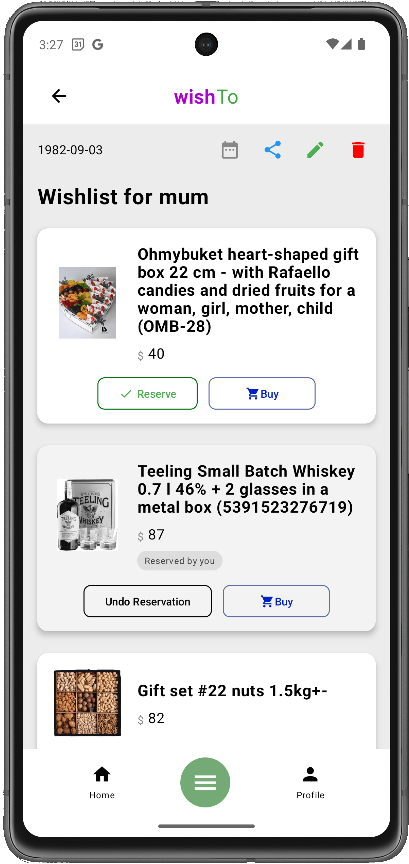
How it looks on WishTo.pro — step by step, in human terms
You can start without signing in: create a wishlist, add your first wish, and share the link. For multiple lists, edits, and lists that survive a new phone or cleared browser data — register or log in and confirm your email. Guests can open someone else’s public list by link without an account — if you shared the URL and turned visibility on.
- Try it now. Open the wishlist form — no sign-in needed for your first list and first wish. When you like the service, create an account to manage more lists and change phones without worry.
- Open wishlists. From the menu — your lists and those shared with you (handy when someone drops you a “see what I want”).
- Create a new list. A name that reads at a glance (“Birthday 2026”, “Kitchen bits”), optional description and event date. Toggle “public by link”: on — you share the URL; off — the list stays private.
- Add a wish. Paste a product link first — the app tries to pull title, image, and price. Did not work? Fine: fill fields manually and add your own photos, just like in the create-item form.
- Share the link. Copy the wishlist URL into any messenger — no need to scroll chat history from a year ago.
- Reservations. On the public page guests can mark a gift as “taken” so nobody buys the same thing twice; easier to keep the surprise for the owner (see hints on the list page).
- Editing together. If someone helps maintain the list, the product has share-for-edit flows — better than passing your password in chat.
Privacy and data behind links — explained on the wishlist privacy page.
Quick answers
Do I need an account?
To try — no: your first wishlist and first wish work without signing in. For multiple lists, edits, and long-term storage — yes. To view someone else’s public list by link — usually no.
Can I mix different shops?
Yes — that is the point: one wishlist can collect links from anywhere.
Where to start today
You do not need a perfect twenty-item list. Add one thing that genuinely cheers you to think about. Polish the title and link tomorrow — the main thing is it does not get lost in the noise.